Your files never sit on a server.

Bifrost sends files of any size straight from one device to another, Windows or Android, end-to-end encrypted. Every transfer ends with a receipt that shows the route it took and what was kept along the way: nothing.

Free and open source under the MIT license. No account, no analytics, no cloud copy.

season-2-raw-footage.zip From Dhaka-Edit-Bay to Berlin-Studio
Direct, 176 ms
Saved on disk0 GB
Speed0 MB/s
Time left–

    A live simulation. Try pausing, or cutting the connection.

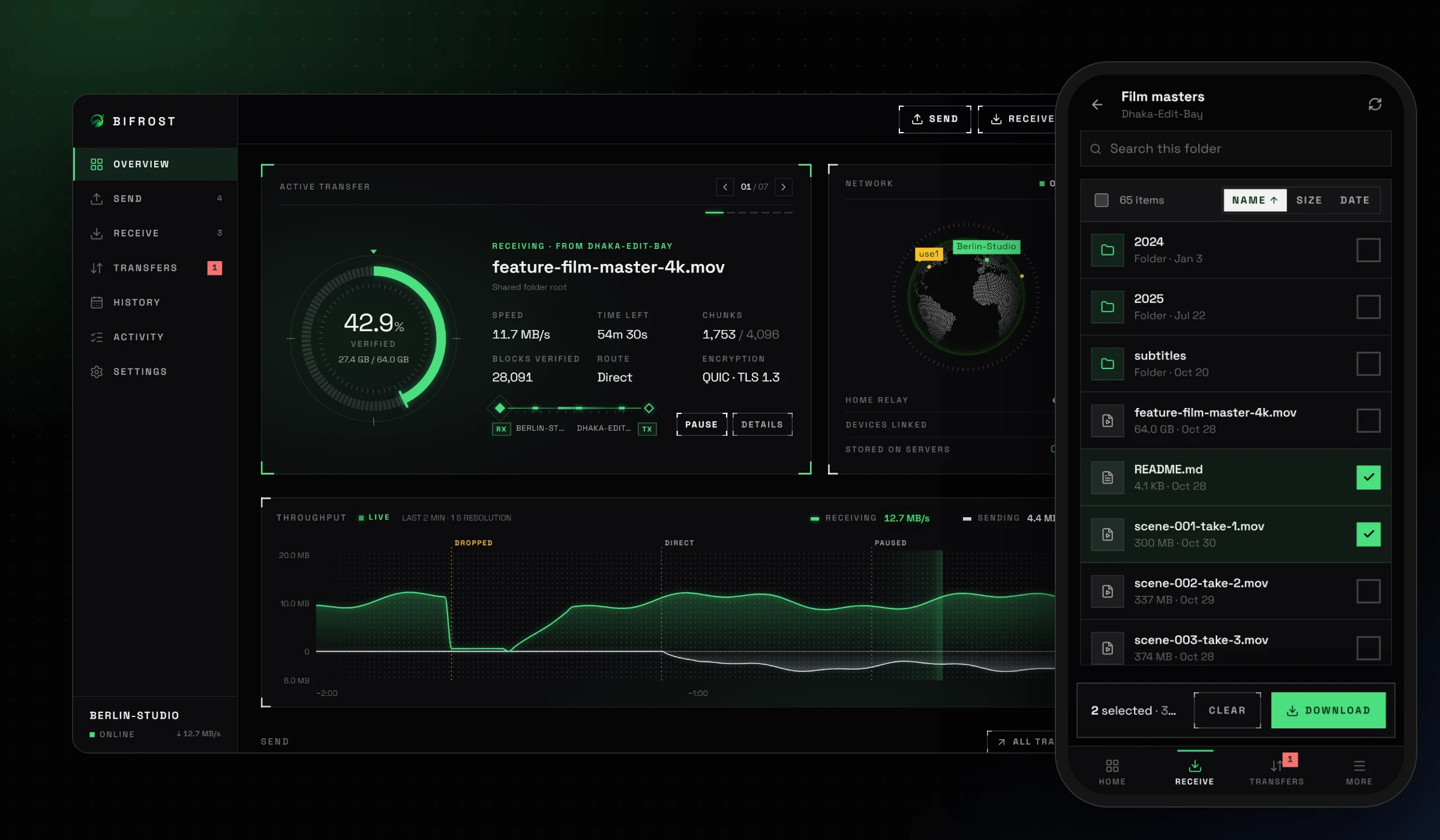
    Bifrost on Windows showing active transfers, and on an Android phone browsing a shared folder

    Privacy you can check.

    Anyone can write "private" on a landing page. Bifrost gives you a receipt for every file instead, stored on your device, that says exactly how it travelled. Here is a real one, line by line.

    scene-041-take-2.mov 18.2 GB from Dhaka-Edit-Bay, Oct 14 at 4:35 PM Direct
    Route Direct, device to device The bytes went from one disk to the other. If a relay ever has to step in, the receipt says how much it carried, encrypted.
    Encryption QUIC with TLS 1.3 The keys exist only on the two devices. Each device proves its identity on every connection.
    Verified 18,637 blocks of 1 MiB Every block is checked with BLAKE3 as it arrives, then the whole file again before it gets its name.
    Fingerprint 8c2d fb51 99af f2f1 a6f2 0abd Both devices record the same fingerprint, so either side can show the file arrived exactly as sent.
    Safety words cedarlanternotterquartzviolet Five words both devices derive from their keys. Same words on both screens means nobody was in between.
    On servers Nothing No account, no upload, no copy. There is no Bifrost server to keep one.

    On Berlin-Studio cedarlanternotterquartzviolet
    On Dhaka-Edit-Bay cedarlanternotterquartzviolet

    Five words rule out a middle-man.

    When a new device asks for access, both screens show five words made from the two devices' keys. Read them to each other. If they match, the connection is between you two and no one else. If anyone tried to sit in the middle, the words would be different.

    Your history stays home.

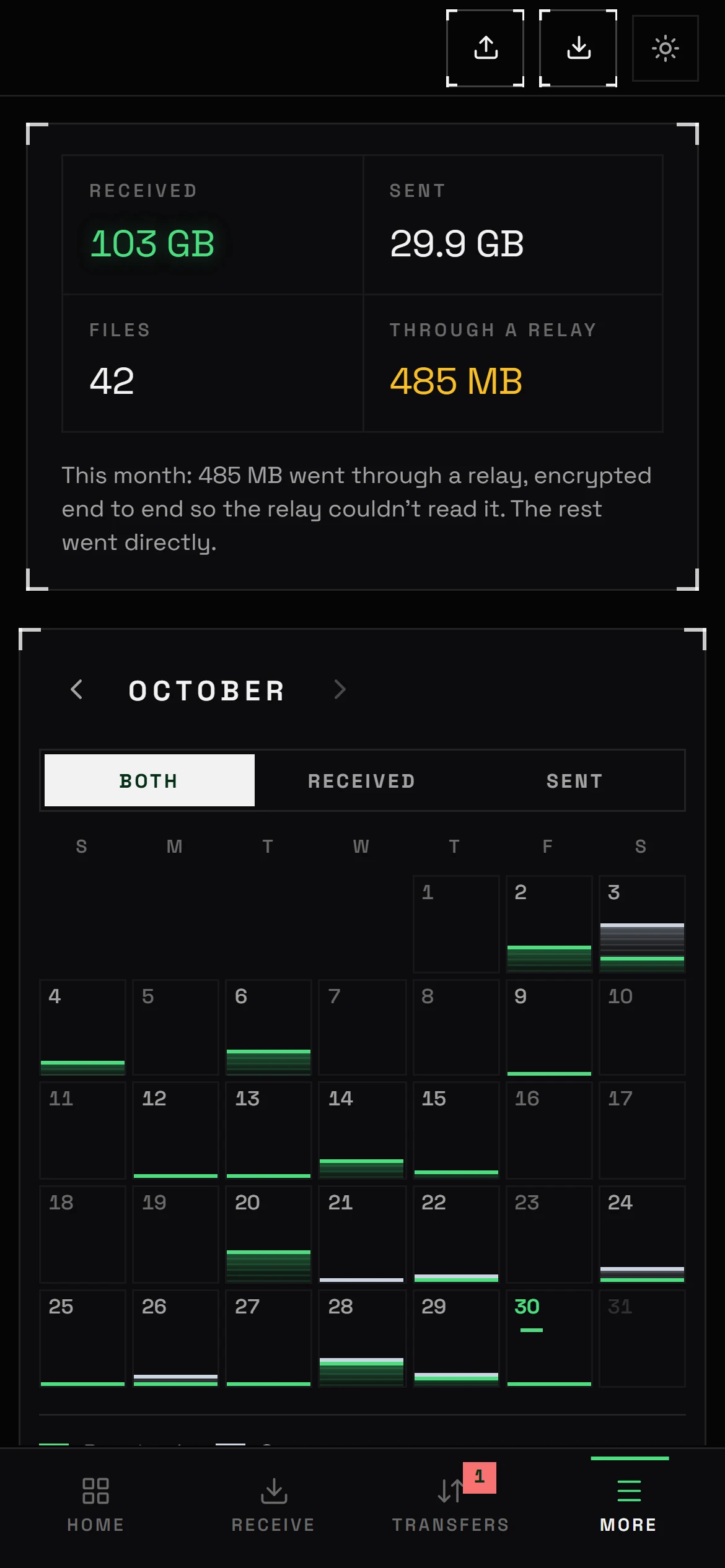
    A calendar shows each day as a dot sized by how much moved. Hover a day to see the files, check who you trade the most data with, and what kind of files they are. All of it is worked out on your device from your own receipts.

    • Never uploaded, never synced
    • Kept for a year by default, or 90 days, 30 days, forever, or not at all
    • Keep sizes and receipts without file names if you prefer
    History screen: a month calendar with dots sized by data moved, totals per device and per file type

    Four steps, no uploads.

    Each file travels once, from the sender's disk to the receiver's, and leaves a matching receipt on both.

    1. 1

      Share a folder

      The sender picks one folder. Nothing outside it can be seen or opened.

    2. 2

      Send an invite

      Copy a link-style invitation or read out a 12-character code. You approve each new device.

    3. 3

      Compare words, pick files

      Check the five safety words match, then browse the folder like a file manager and choose where to save.

    4. 4

      Every byte checked

      Each megabyte is hash-verified on arrival, and the whole file once more before it is named.

    Interruptions cost seconds, not hours.

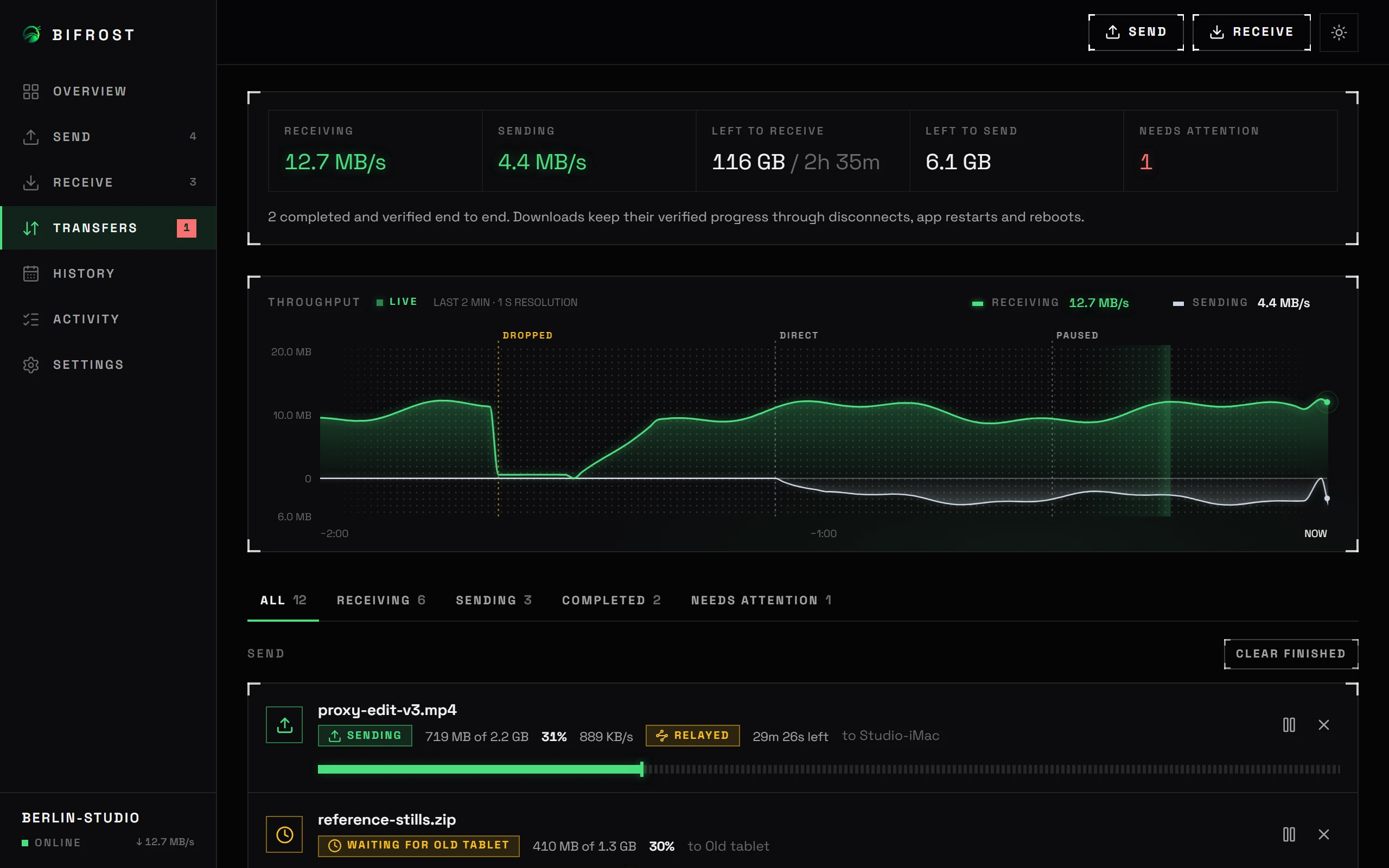
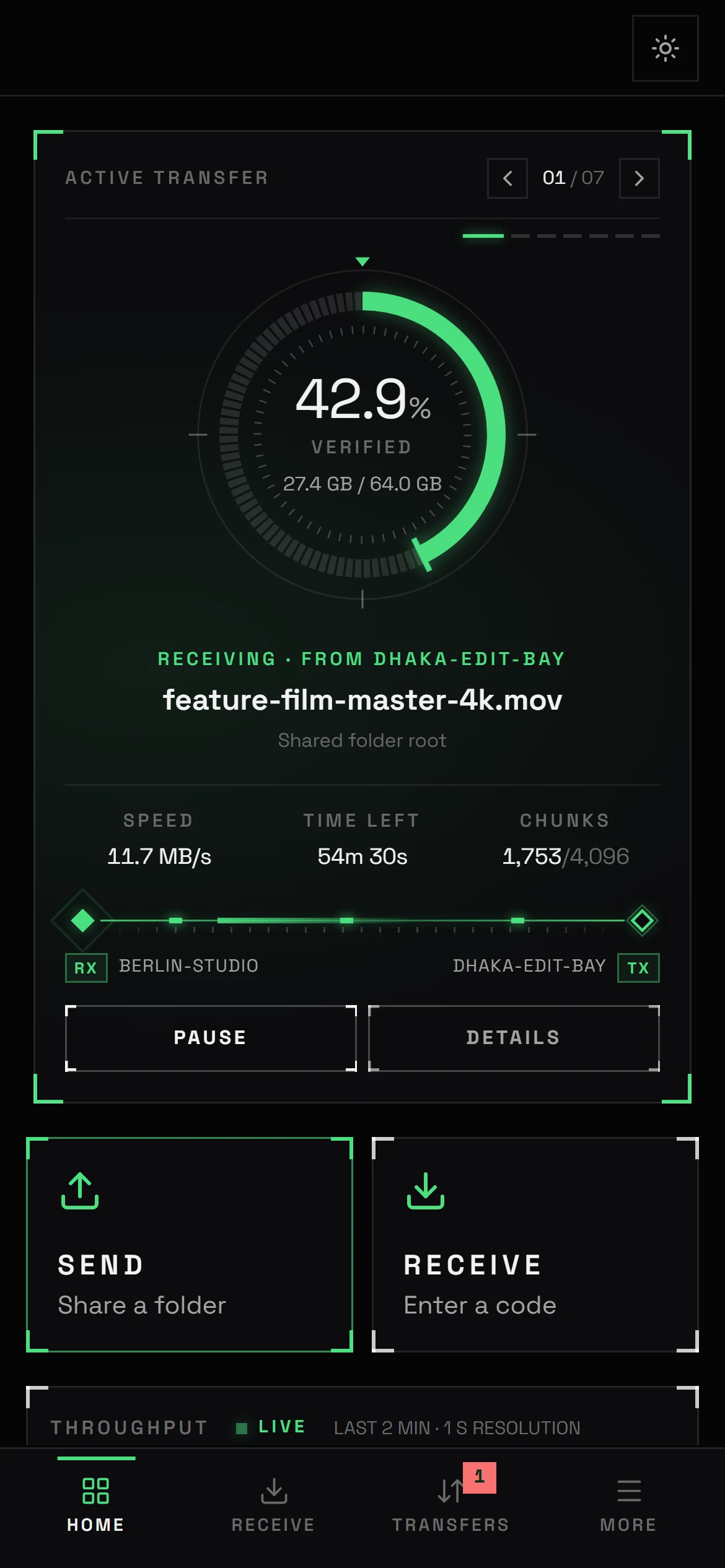
    Progress is written to disk every megabyte, after it is verified. A dropped connection, a pause, a closed laptop or a power cut loses at most the block in flight. Downloads wait for the sender to come back and continue on their own.

    • Pause and resume any time
    • Survives app restarts and reboots
    • Detects if the sender changes the file mid-transfer
    Transfers screen with a 64 GB download in progress and its verified progress details

    Fast on long, lossy links.

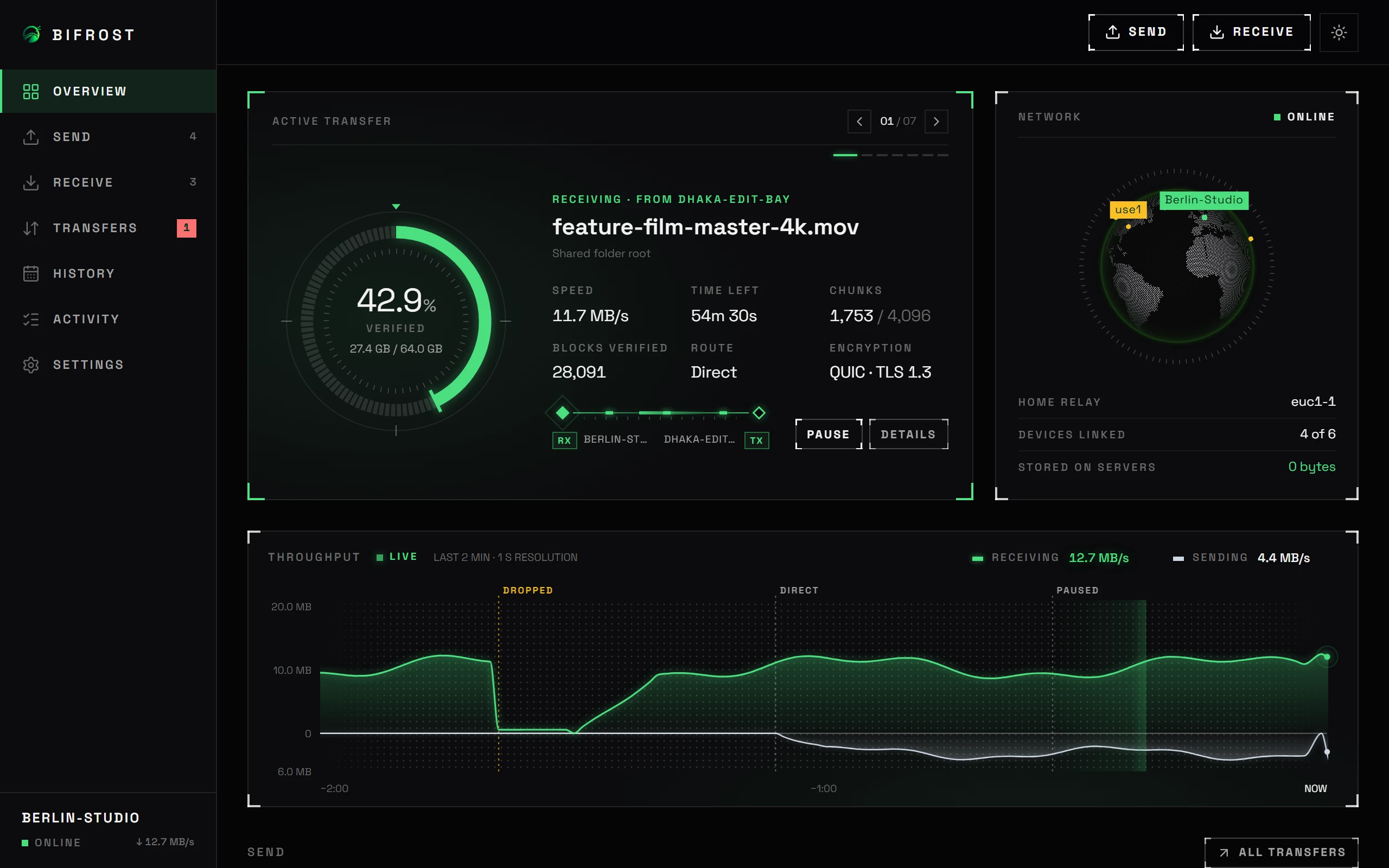
    Bifrost uses QUIC with BBR congestion control and many parallel streams, so a Dhaka to Berlin link stays full instead of collapsing at the first lost packet. A live graph shows both directions and marks every pause, reconnect and route change. It runs at low CPU priority and never loads a whole file into memory.

    • Up to 32 parallel streams per file
    • Optional upload and download limits
    • Around 45 MB of memory for the app process on Windows
    Overview screen with a live graph of receive and send speed over the last two minutes, and active transfers

    Browse first, then choose.

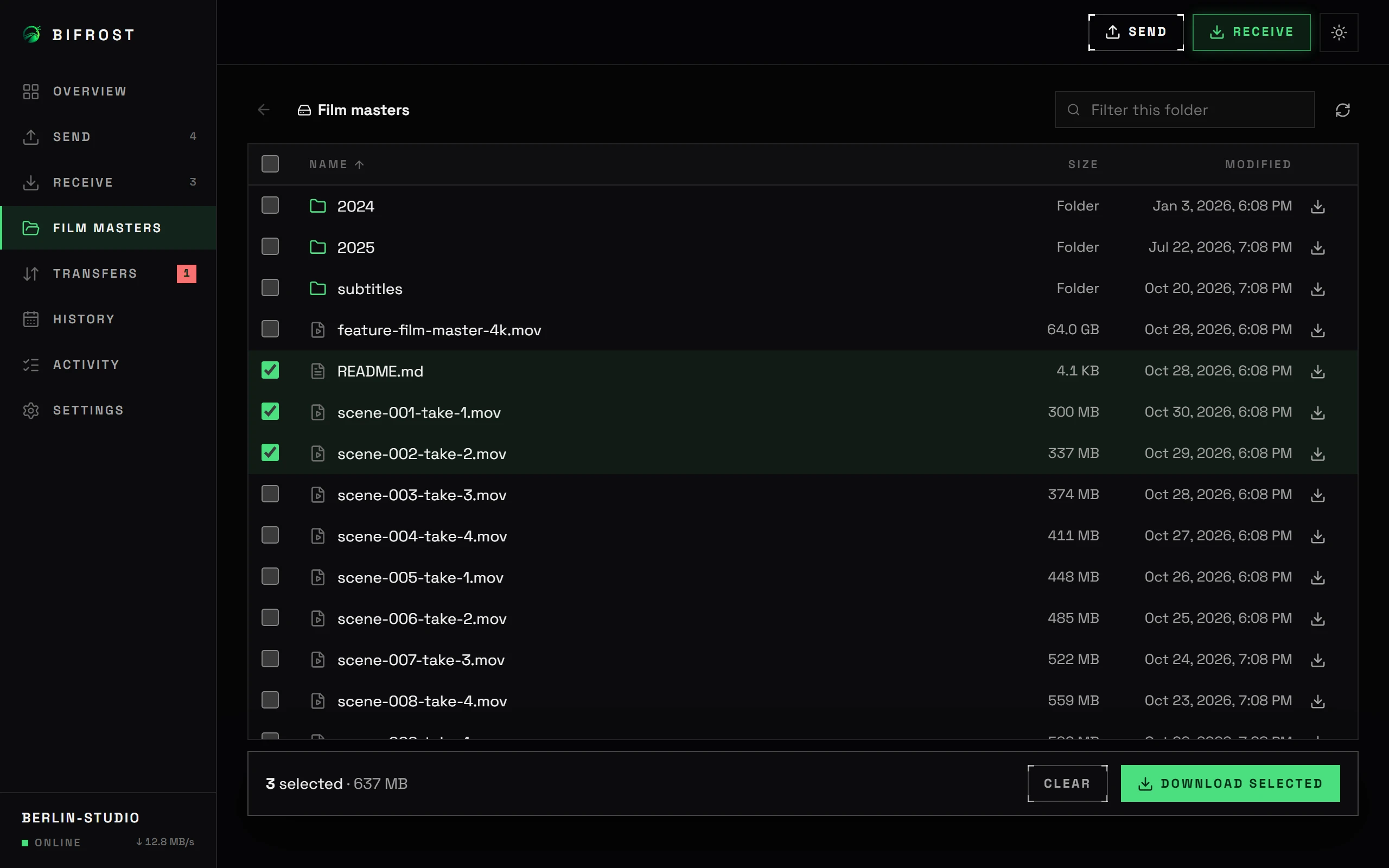
    The receiver sees the shared folder with names, sizes and dates, searches it, and downloads single files or whole folders. Big folders load as you scroll, so a directory with thousands of files stays quick.

    • Folder downloads keep their structure
    • Read-only: nothing can be changed or deleted
    Remote folder browser with three files selected for download

    The same app on your phone.

    Send from a PC to a phone, from a phone to a PC, or phone to phone. On Android, transfers keep running with the screen off and show their progress in a notification.

    • Android 7.0 and newer
    • Saves to Download/Bifrost by default
    Bifrost home screen on Android History calendar on Android with a dot for each day files moved

    Who sees what.

    Two devices on the internet need a little help to find each other. Here is everything that help can see, and everything it can't.

    Only your two devices

    • File names, folder listings and file contents
    • Who you share with, and your transfer history
    • Receipts, fingerprints and safety words
    • Your invitation keys, stored as hashes on the sender

    The coordination service

    • Two device IDs and their IP addresses, so they can punch through routers
    • For a short code, a sealed record it can't open, for 30 minutes
    • Encrypted packets it can't read, only when routers block a direct path (or never, in direct-only mode)

    Anyone else, including us

    • Nothing. There is no Bifrost account, server or analytics.
    • Invitations you controlRandom 128-bit keys that expire, can be limited to a number of devices, and can be revoked.
    • Approval for new devicesYou see the device name and safety words before it can browse anything. Remove access in one click.
    • One folder, read-onlyPath tricks, symlinks and junctions that point outside the folder are refused by the sender.
    • Direct first, never silentDirect paths are always tried first; the route is shown live and every relayed byte is on the receipt. Direct only is one setting away.

    How it compares.

    Capability Bifrost Cloud share links Chat and messaging apps
    File size limitNoneUsually a few GBUsually 2 GB or less
    Travels over the internetOnce, device to deviceTwice: upload, then downloadTwice, through their servers
    Copy kept on a serverNeverUntil the link expiresOften
    Resumes after a dropFrom the last megabyteSometimesRarely
    Verifies every byteYes, block by blockVariesVaries
    Both devices onlineRequiredNot requiredNot required

    Bifrost trades the convenience of an always-on server for privacy and no size limits: the sender has to stay online while the receiver downloads.

    Download Bifrost.

    Latest release. Free, no account needed.

    Seeing a warning when you install?

    Bifrost is new and not yet code-signed by a certificate authority, so Windows SmartScreen may show “Windows protected your PC”: choose More info, then Run anyway. On Android, allow your browser or file manager to install apps when asked; if Play Protect shows a warning, choose More details, then Install anyway. Every release lists SHA-256 checksums so you can confirm the file is genuine.

    Built in the open.

    Bifrost is MIT licensed. The transfer engine is a Rust library with end-to-end tests for interruptions, crashes, corruption and source changes; the apps use Tauri with a React interface. Issues, ideas and pull requests are welcome.

    # Build and run from source
    git clone https://github.com/MisbahKhan0009/Relayless
    cd Relayless && npm ci
    npm run tauri dev
    
    # Engine tests: real transfers, pauses,
    # crashes, corruption, source changes
    cargo test -p relayless-core --release

    Questions.

    Do both devices have to be online?

    Yes, while the transfer runs. If either one goes offline, the download waits and continues from where it stopped when both are back.

    What if a direct connection is impossible?

    Some networks, mobile data in particular, block direct paths. Bifrost tries direct first and, after about 15 seconds, continues through a public relay. The data stays end-to-end encrypted, so the relay can't read or keep it, and it switches back to direct as soon as a path opens. The receipt shows how much went through the relay. If you'd rather wait for a direct path, choose Direct only in Settings.

    Is there a size limit?

    No. Files are streamed from disk in small blocks, so a 500 GB file uses the same memory as a 5 MB one. You need enough free space on the receiving side.

    How fast is it?

    As fast as the slower of the two connections allows, which is usually the sender's upload speed. Bifrost is tuned to keep long-distance links full.

    Can the other person see my other files?

    No. They can only list and download from the folder you shared, and only after you approve their device. You can stop sharing or remove a device at any time.

    Where is my transfer history stored?

    Only in the app's database on your device. Nothing is synced or uploaded. You choose how long it is kept, can keep it without file names, and can clear it at any time in Settings.

    What are safety words for?

    They let two people confirm, out loud or over a call, that their devices are talking to each other directly. They are derived from both devices' keys, so a device in the middle would produce different words.

    Does it cost anything?

    No. Bifrost is free and open source. There is no account and no paid tier.